

Close Menu

    Subscribe to Updates

    Get the latest creative news from FooBar about art, design and business.

    What's Hot

    WhatsApp Privacy Settings Every Ugandan Should Change Today

    November 3, 2026

    Mobile Money Scams in Uganda: 8 Common Tricks and How to Protect Yourself

    November 2, 2026

    Why AI Is Making Smartphones Pricier in Uganda (and How to Buy Smart)

    November 1, 2026
    Facebook X (Twitter) Instagram
    Trending
    • WhatsApp Privacy Settings Every Ugandan Should Change Today
    • Mobile Money Scams in Uganda: 8 Common Tricks and How to Protect Yourself
    • Why AI Is Making Smartphones Pricier in Uganda (and How to Buy Smart)
    • Showmax is No More: What Every Ugandan Streamer Needs to Know for 2026
    • How AI is Changing Sports Analytics (2026 World Cup) – Full Guide
    • The Untold Influence of African Talent on the 2026 World Cup
    • AI Agents Explained: What They Are, Best Tools, and How They’re Replacing Software (2026)
    • Over 10,000 to Benefit as Victoria University Launches Free AI Classes
    Facebook X (Twitter) Instagram
    Waitu IntelligenceWaitu Intelligence
    • Home
    • TECH & AI
      • AI & Artificial Intelligence
      • Apps & Software
      • Cybersecurity
      • Gadgets
      • Reviews
      • Smartphones
    • TUTORIALS & SKILLS
      • Content Creation
      • Freelancing
      • Graphic Design
      • How-To Guides
      • Internet & WiFi
      • Networking
      • Online Tools
      • Remote Work
      • Web Development
      • Windows & PC Fixes
      • WordPress
    • GOVERNANCE
      • Governance Analysis
      • National Affairs
      • Parliament
      • Public Policy
      • Trade Unions
    • BUSINESS & OPPORTUNITIES
      • Agriculture
      • Business Ideas
      • Digital Economy
      • Finance
      • Grants & Funding
      • Internships
      • Jobs
      • Scholarships
      • Startups
      • Training Programs
    • OPINIONS & NEWS
      • Commentary
      • Community Stories
      • Editorials
      • Events
      • Interviews
      • Investigations
      • Public Reactions
      • Trending Stories
    Waitu IntelligenceWaitu Intelligence
    Home»TECH & AI»WhatsApp Privacy Settings Every Ugandan Should Change Today
    TECH & AI

    WhatsApp Privacy Settings Every Ugandan Should Change Today

    WhatsApp Privacy Settings Every Ugandan Should Change Today
    AfricanSunBy AfricanSunNovember 3, 2026Updated:November 3, 2026No Comments4 Mins Read
    Facebook Twitter WhatsApp LinkedIn Email Telegram
    Follow Us
    Facebook X (Twitter) YouTube LinkedIn TikTok Telegram RSS
    Share
    Facebook Twitter LinkedIn Pinterest Email WhatsApp Telegram

    WhatsApp is how many of us talk to family, run small businesses, join community groups and even receive school and church announcements. That makes it a favourite target for scammers and snoops. The default settings are not always the safest, but you can fix most of the risks in about ten minutes.

    Note: menu names can differ slightly between WhatsApp versions and between Android and iPhone. Look for the closest match if a label is different on your phone.

    1. Turn on two-step verification (the most important one)

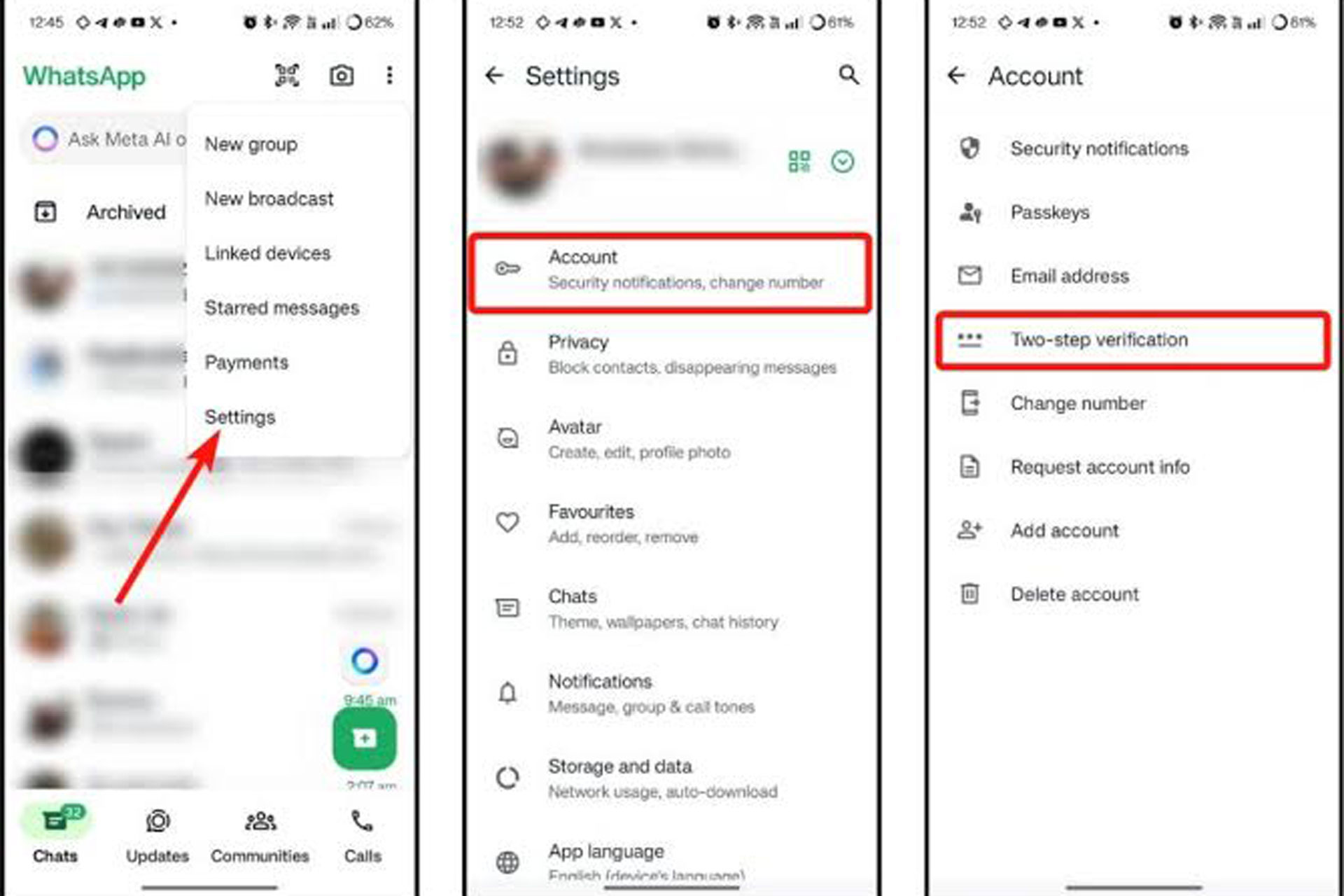
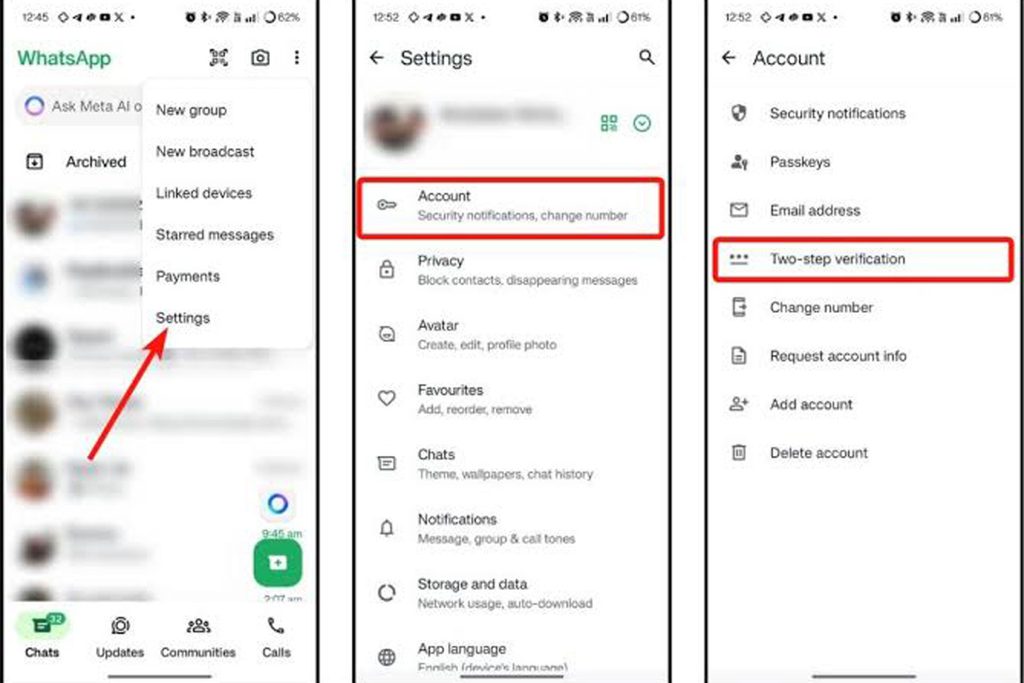
    Two-step verification adds a PIN that WhatsApp asks for when someone tries to register your number on a new phone. Go to Settings → Account → Two-step verification, set a six-digit PIN that is not your birth year, and add an email address so you can recover it. Do not use the same PIN as your mobile money PIN.
    2. Never share your six-digit WhatsApp code

    A common takeover trick works like this: a stranger or a hacked contact asks you to send them “the code that just arrived by SMS.” That code is the key to your account. No one needs it, ever. If you get a code you did not request, ignore it.

    3. Control who can add you to groups

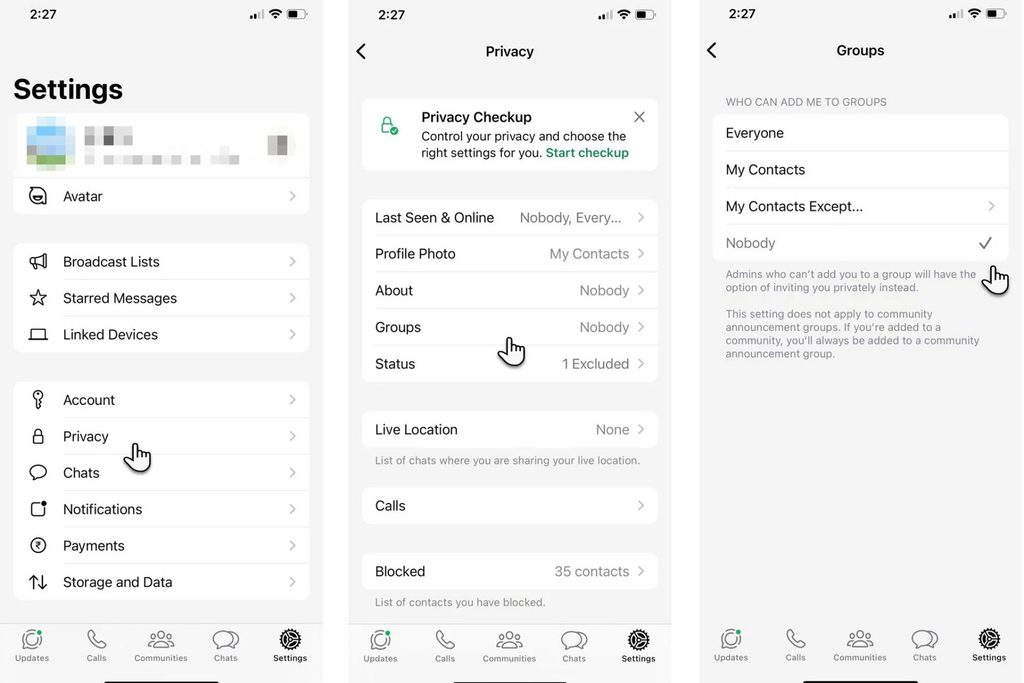
    Open Settings → Privacy → Groups and choose My contacts (or “My contacts except…”). This stops strangers from adding you to scam, betting or investment groups.
    4. Limit what strangers can see

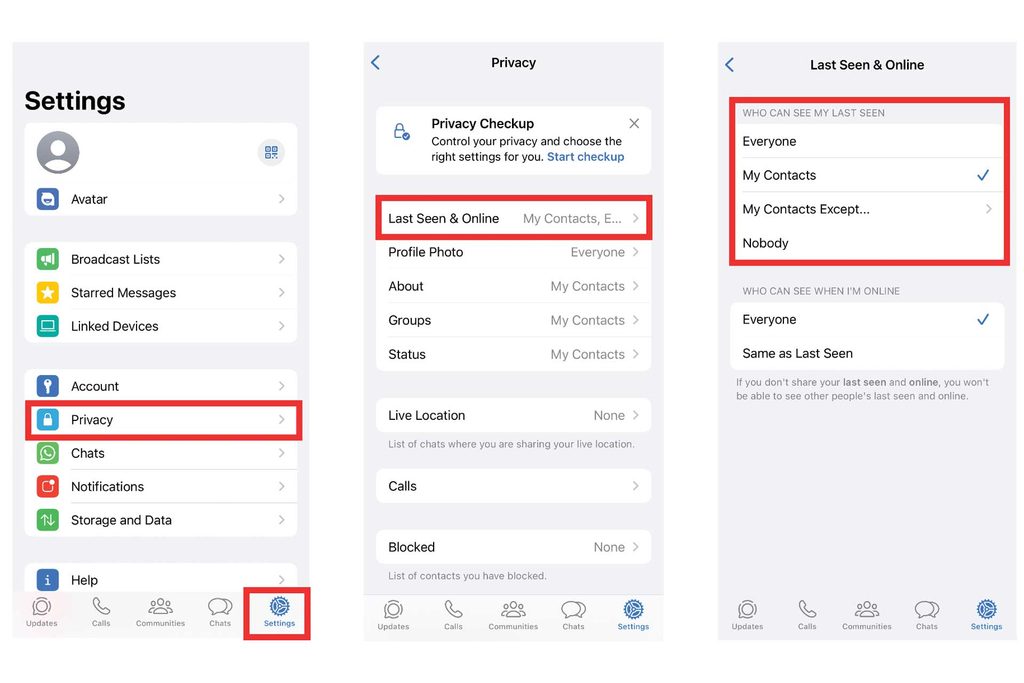
    Under Settings → Privacy, review Last seen and online, Profile photo, About and Status. For most people, My contacts is the sensible choice. If you run a business account, decide what customers truly need to see.
    5. Silence unknown callers

    In Settings → Privacy → Calls, turn on Silence unknown callers. Calls from numbers not saved in your phone will not ring, which cuts down on spam and scam calls.

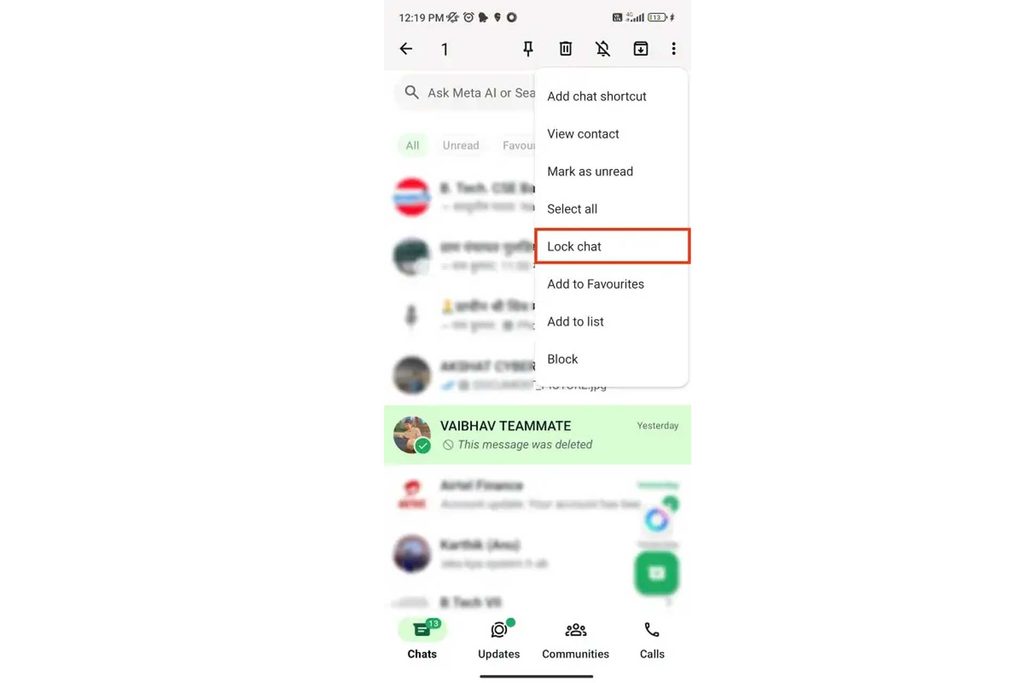
    6. Lock private chats

    Open a chat, tap the contact name, and look for Chat lock (the name may vary). Locked chats move to a hidden folder that needs your fingerprint, face or phone passcode. This helps if someone borrows your phone.
    7. Check Linked devices

    Go to Settings → Linked devices. Anything listed that you do not recognise should be logged out right away. Scammers sometimes link your account to a computer or browser to read your messages.

    8. Review your Privacy Checkup

    WhatsApp has a guided Privacy Checkup (in Settings → Privacy) that walks you through the main controls. It is a good way to catch anything this guide missed.

    9. Use encrypted backups carefully

    Chat messages are end-to-end encrypted while they travel, but backups to your cloud storage can be less protected unless you turn on end-to-end encrypted backup in Settings → Chats → Chat backup. If you enable it, store the password or key somewhere safe, because you may not be able to recover your backup without it.

    Spot the scams that use WhatsApp

    • “Hi, it’s me, I changed my number.” Verify by calling the old number before sending money.
    • Urgent requests for mobile money from a friend’s account. Call them first, because their account may be hacked.
    • Job or investment offers that ask for a fee up front.
    • Links to “free data” or “win a phone.” Do not click them, and do not forward them.

    If your account has been taken over

    1. Reinstall WhatsApp on your own phone and register your number again. You will receive a new code by SMS.
    2. Turn on two-step verification straight away.
    3. Warn your contacts through another channel that your account was compromised.
    4. Check Linked devices and log out anything unfamiliar.
    5. Visit WhatsApp’s official help centre for the latest recovery steps.

    Frequently asked questions

    Can someone read my WhatsApp chats without my phone?

    Not normally, unless your account is linked to another device or you shared your verification code. That is why checking Linked devices and using two-step verification matters.

    Is WhatsApp safe to use for business?

    It can be, with the right habits: two-step verification, a locked phone, and careful handling of payment requests. Consider keeping customer chats separate from personal ones.

    What should I do if a friend’s account sends me a strange message?

    Do not reply with money or codes. Call your friend on a normal phone call to confirm, and tell them to check their account.

    Final thoughts

    Ten minutes today can save you a lot of trouble later. Turn on two-step verification, limit group invites, and never share your verification code. Then share this guide with the relatives who are most likely to be targeted.

    Share. Facebook Twitter LinkedIn WhatsApp
    AfricanSun

    Related Posts

    Mobile Money Scams in Uganda: 8 Common Tricks and How to Protect Yourself

    November 2, 2026

    Why AI Is Making Smartphones Pricier in Uganda (and How to Buy Smart)

    November 1, 2026

    Showmax is No More: What Every Ugandan Streamer Needs to Know for 2026

    June 18, 2026
    Leave A Reply Cancel Reply

    Demo
    Top Posts

    The Untold Influence of African Talent on the 2026 World Cup

    June 13, 202643 Views

    Best Affordable Smartphones in Uganda 2026: Top Picks Under 500k

    May 10, 202636 Views

    How AI is Changing Sports Analytics (2026 World Cup) – Full Guide

    June 15, 202629 Views
    Don't Miss
    TECH & AI

    WhatsApp Privacy Settings Every Ugandan Should Change Today

    By AfricanSunNovember 3, 20260

    WhatsApp is how many of us talk to family, run small businesses, join community groups…

    Mobile Money Scams in Uganda: 8 Common Tricks and How to Protect Yourself

    November 2, 2026

    Why AI Is Making Smartphones Pricier in Uganda (and How to Buy Smart)

    November 1, 2026

    Showmax is No More: What Every Ugandan Streamer Needs to Know for 2026

    June 18, 2026
    Stay In Touch
    • Facebook
    • YouTube
    • TikTok
    • WhatsApp
    • Twitter
    • Instagram
    Latest Reviews
    Demo

    Recent Posts

    • WhatsApp Privacy Settings Every Ugandan Should Change Today
    • Mobile Money Scams in Uganda: 8 Common Tricks and How to Protect Yourself
    • Why AI Is Making Smartphones Pricier in Uganda (and How to Buy Smart)
    • Showmax is No More: What Every Ugandan Streamer Needs to Know for 2026
    • How AI is Changing Sports Analytics (2026 World Cup) – Full Guide

    Recent Comments

    1. Essential WhatsApp Privacy Settings for Ugandans to Change on Mobile Money Scams in Uganda: 8 Common Tricks and How to Protect Yourself
    2. Essential WhatsApp Privacy Settings for Ugandans to Change on Why AI Is Making Smartphones Pricier in Uganda (and How to Buy Smart)
    3. trading platform on Best Affordable Smartphones in Uganda 2026: Top Picks Under 500k
    4. fintechbase on Best Affordable Smartphones in Uganda 2026: Top Picks Under 500k
    5. SGR Contract Cancellation Chaos: What You Need to Know on Understanding How Parliament Committees Work in Uganda

    Waitu Intelligence is a Uganda-based blog covering tech, AI, and digital opportunities for readers across East Africa — from smartphone reviews and AI tools to jobs, scholarships, and streaming updates.

    Facebook X (Twitter) Instagram YouTube TikTok
    Our Picks

    WhatsApp Privacy Settings Every Ugandan Should Change Today

    November 3, 2026

    Mobile Money Scams in Uganda: 8 Common Tricks and How to Protect Yourself

    November 2, 2026

    Why AI Is Making Smartphones Pricier in Uganda (and How to Buy Smart)

    November 1, 2026

    Subscribe to Updates

    Get the latest creative news from from us.

    Archives

    • November 2026
    • June 2026
    • May 2026

    Categories

    • AI & Artificial Intelligence
    • Apps & Software
    • BUSINESS & OPPORTUNITIES
    • Commentary
    • Cybersecurity
    • GOVERNANCE
    • Governance Analysis
    • How-To Guides
    • Internet & WiFi
    • National Affairs
    • OPINIONS & NEWS
    • Parliament
    • Public Policy
    • Remote Work
    • Scholarships
    • Smartphones
    • Streaming & Digital Entertainment
    • TECH & AI
    • Training Programs
    • Travel & Tourism
    • Trending Stories
    • TUTORIALS & SKILLS
    • Windows & PC Fixes
    © 2026 Intelligence. Designed by Waitu Intelligence.
    • Advertise
    • About
    • Privacy Policy
    • Contact

    Type above and press Enter to search. Press Esc to cancel.